Showing posts with label Naba Barkakati. Show all posts

Wednesday, December 14, 2011

NBTMV - On the need to assess impact of technology before adopting it


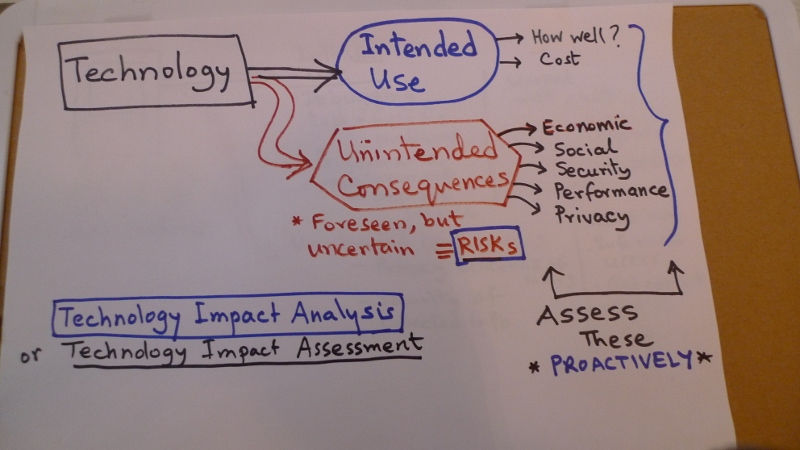
It’s important to assess the impact of technology before using it either in a product or for your or your organization’s use (for that matter, for the nation’s use as well).
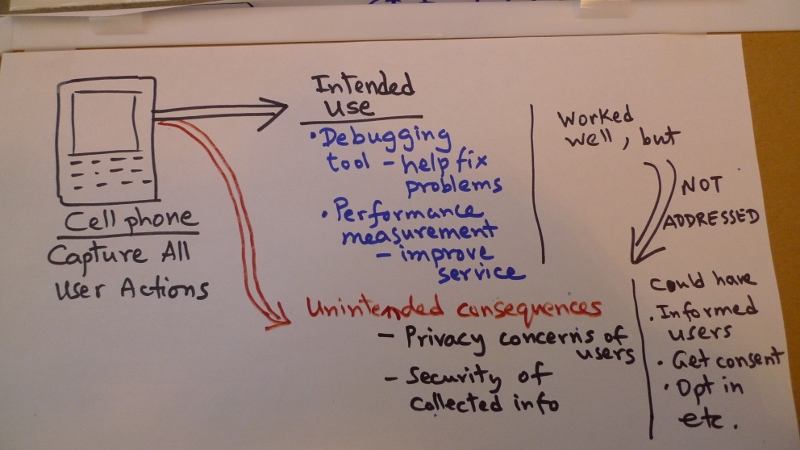
Let’s start with an example. Suppose you are a cell phone manufacturer and you decide to capture all user actions so that you can “debug” -- fix problems -- when something goes wrong and also improve performance when you see some parts of the system not performing to expectation. Capturing user actions is a perfectly valid approach to this need, but, if you did not inform the users upfront, they’d probably be concerned about privacy and security of the collected information.
As another example, suppose we promote production of ethanol from corn as a fuel and as a way to reduce dependence on fossil fuel. However, corn is also used as food and as cattle feed. What if there is impact on food prices and cattle feed because corn is diverted from these uses to ethanol production.
One way to avoid such problems is to conduct a technology impact analysis (or technology impact assessment) up front. The framework is fairly straightforward. You consider the technology for some intended use. Now, before you adopt the technology, think of all the unintended consequences, which are usually not good. These are foreseen, but uncertain, and, therefore, “risks.” If you think of them up front, you can then take action to either mitigate these risks or decide to accept them.
In the case of the cell phone example, if this was done, the cell phone manufacturer could have foreseen the privacy and security risks and acted beforehand by informing the users about the intended use of the information being captured and letting them opt in, if they so desired.
In summary, it’s important to assess the impact of technology before deciding to incorporate it in a product or adopting it for your or your organization’s use. Proactively doing an impact assessment could save you lots of headaches and, not to mention, potential negative consequences later on.
Here's some more information to help you...
The following book covers similar ideas and may be interesting to check out:

Monday, December 12, 2011

NBTMV - Step 2 in learning Spanish is to Listen and Understand


I have been using a 3-step process for learning to speak Spanish: (1) Listen and Repeat, (2) Listen and Understand, and (3) Start Speaking (of course, you also have to study vocabulary and grammar along the way). For the Listen and Repeat step, if you use the Pimsleur method, as I did, then you’d have already learned the basics -- Spanish pronunciation, alphabet, numbers, days of the week, and so on and you would be speaking some Spanish already.
However to get ready for conversations in Spanish, you need to complete the next step -- Listen and Understand Spanish so that you can understand when someone talks to you. I started this second step by watching a free online streaming video program called Destinos: An Introduction to Spanish that’s essentially a telenovela with 52 episodes, each 30 minutes long. I watched all 52 episodes twice and only then I could begin to understand them comfortably.
Next, I began listening to a local Spanish radio station on my commute to work. And, when possible, began watching TV programs on Telemundo or Univision.
When you first begin listening with the intention of trying to understand, you’ll found it difficult to keep up, as I did, but just keep at it and slowly you’ll begin to understand more. Although the basics you learned in Step 1 should get you going, you should also study some vocabulary on the side. I read Mastering Spanish Vocabulary to expand my vocabulary. That attempt also got me started with reading Spanish and I realized how easy it is to read in Spanish -- you just say words as they are written (you know what I mean if you try to read Fench :-)
By now, I can speak some Spanish, but I still have more grammar to learn and, even now, I cannot fully follow along when people speak fast on the radio. But the main point is that by first devoting time to listening and repeating and then spending tons of time listening and understanding, I was able to get to the point where I could begin speaking Spanish. I’m sure you can do the same with my method for learning to speak Spanish.
Here's some more information to help you...
For my previous videos on the 3-step method for learning Spanish and the details of the first step, see:


To watch the Destinos streaming video, visit the Annenburg Media web page at: http://learner.org/resources/series75.html and click the VoD (video on demand) link to the right of an episode. 
Here's the vocabulary book I found useful:

Monday, December 5, 2011

NBTMV - To learn Spanish, start by listening and repeating


In an earlier video I described my method for learning Spanish: (1) Listen and Repeat, (2) Listen to Understand, and (3) Start Speaking. In this video, I elaborate on what I did for my “Listen and Repeat” step, where I simply listened to a native Spanish speaker and repeated as requested, without knowing any Spanish grammar or how to write in Spanish.
I followed the Pimsleur method for this, primarily because they provide the lessons on CDs and I could listen to the CDs and repeat loudly during my morning commute. Each lesson is 30 minutes long. The instructor gave directions in English asking me to listen and repeat in a conversational voice whatever was being asked of me -- repeat words, respond to question, all in Spanish, of course. And that’s the main point -- you repeat as closely as possible what a native Spanish speaker says. Here’s an example from the first CD where a man and a woman converse:
-- Perdon, señorita. ¿Entiende ingles?
-- No, señor. No entiendo ingles. Hablo español.
-- Hablo un poco español.
The lessons really make sure you get the pronunciation... for example, for “Per-don,” the instructor says “don” and “per”, with rolling “r” and then put together “per-don.” Similarly for “señor,” “español,” and “ingles.”
Pimsleur suggests that you do one lesson a day, but you can repeat that lesson. I did one lesson a day and, taking into account weekends and holidays etc., finished the 90 lessons of Pimsleur Spanish I, II, and III in 6 months. These lessons gave me a good start with Spanish pronunciation and basic vocabulary, but I still couldn’t converse in Spanish. I was afraid and often couldn’t understand the question. So I had to continue to “Listen and Understand” Spanish, learn vocabulary and grammar, and “Begin Speaking.”
Now I can speak some Spanish, but I still need to learn a lot more grammar. Nevertheless, by “listening and repeating” I was speaking right from the start and that kept me motivated.
If you are thinking about learning Spanish, you should definitely start with lessons where you “listen and repeat” what a native speaker says.
Here's some more information to help you...
You can find links to Pimsleur and Rosetta Stone Spanish lessons in my previous blog:


I even made a video in Spanish explaining my method for learning a new language, you can view on this blog post:


Monday, November 21, 2011

NBTMV - Book air and hotel, then explore city on your own


After you have taken one or two escorted tours and feel comfortable traveling around, you can start booking just the air and hotel from a travel company and explore the city on your own. In this video, I give you some pointers on doing this yourself.


This approach is usually good for a major city. You’d book the air and hotel from one of the same travel companies that you used for guided tours. Some offer choice of hotels at different locations for different prices, so you’d have to read up a bit and try to pick a hotel at a convenient location or just go with the lowest cost one. After you book, remember to get the visa, if you need one.


You’ll be exploring the city on your own, so you also must take care of the transfers between the airport and the hotel. You should search and see if there is a train, metro, or bus available for the trip from airport to the hotel and take it, if it’s available.


To plan for sightseeing on your own, you should get a guidebook for the city and study it a bit before you depart. If you are unsure about what to see, a good option is to take a half- or full-day city tour and get an overview of the major attractions.


Mastering the local public transportation options is also helpful. We usually take metro or tram as much as possible.


You should develop a rough itinerary as well. I typically divide the day into two halves and just allocate activities to each half-day, along with times for lunch and dinner. Remember not to cram in too much in a day. If possible buy tickets online (before departing on the trip) for any museums or other sights that require tickets. That way, you can avoid any long lines for the tickets and save some time.


We also consult Tripadvisor to find some restaurants that we may like to try. After returning from the trip, you may want to post your own reviews, as we have done in our own reviews on Tripadvisor for any hotels and restaurants we try out.


That’s about it. With a little bit of peparation, you should have a great time exploring the city of your choice on your own.
Here's some more information to help you...
You can use this approach to visit many prominent cities around the world. Here are some candidates: London, Paris, Rome, Florence, Venice, Barcelona, Madrid, Budapest, Istanbul, Prague, Lisbon, Rio de Janeiro, Buenos Aires, and many more. Browse the Independent Vacations in Gate1Travel for more ideas. Another option is to pick a city and then look for Flight+Hotel packages on travel websites such as Expedia and Travelocity.

Pick up a travel guide for the city you plan to visit and study it before the trip. Check out the map to pick a good location for the hotel. Here are some possible travel guides:

Saturday, October 29, 2011

What is Cloud Computing


Cloud computing has become a popular buzzword, but many managers find it confusing. Those old enough to remember time share computing tend to say, “oh, it’s just like timeshare systems we had in old days,” but cloud computing is more than that. It’s w-a-a-y more than lots of users logging into a mainframe through green-screen terminals.
You can understand “cloud computing” better by focusing on just the basics. Let’s start with the physical computer. Whether it’s a laptop, desktop, or a rack-mounted server, at its heart you have the processor, memory, storage, and network connection. On that physical computer you had an operating system -- Windows, Linux, etc. - - and many applications - - email, word processing, spreadsheet, databases.
Along comes the concept of “virtualization” - - the idea that instead of just running multiple applications on a physical computer, you can create “virtual machines”, each with its own virtual collection of memory, storage and network connection, RUNNING an operating system and set of applications. Thanks to the virtualization software, each virtual machine will be able to operate as if it had its own memory, storage, and network connection (or multiple network connections, for that matter).
So virtualization gives you the ability to run multiple “virtual machines” on a single physical machine. You can, in fact, have multiple virutal machines running different operating systems (Windows, Linux, what have you) irrespective of what operating system is running on the underlying physical system. The virtualization is possible through software, for example, VMware or .
There is another element as well - - management software that enables a system administrator to easily create virtual machines and “provision” them - - allocate memory, storage, install operating system etc. on the virutal machines.
Once you have the virtualization software with the management software to easily provision virtual machines, throw in Internet connectivity and you have a cloud - - the term is used because in network diagrams, the Internet is typically depicted by a cloud. You could say “virtualization + great Internet connectivity” = cloud computing - - BECAUSE now users can access your computing resources from anywhere and make use of the capabilities.
All the other terms you hear about cloud computing - - relating to types of service such as infrastructure as a service, platform as a service, or software as a service or <insert your favorite application name> as a cloud… AND terms relating to how they are deployed (read “for whom”) such as public cloud, community cloud, or government cloud or hybrid cloud or, again, insert <your favorite qualifer> cloud (such as Joe’s cloud or Jane and Mary’s cloud) are just qualfiers... at the heart, each must be a “cloud” as I explained earlier -- use virtualization, be able to create and provision virtual machines easily, and have great Internet connectivity.


Here are some more things to help you..

I had presented a talk on cloud computing (it was about IT and Network convergence, which, when I began developing became a presentation on cloud computing) that you may find helpful Below are the slides and then I have the 30-minute video in two parts (had to split into two 15-minute parts) of my talk based on the presentation.


After you skim through the slides (there are only 15 slides :-) you can watch the videos below:
 
Part 1 of KISDI talk Nov 2010

Part 2 of KISDI talk Nov 2010
Tags: , , ,


Naba Barkakati's three-minute vidoes (NBTMV)


I have started posting 3-minute videos on Youtube on various topics. In my first posting, I described what I intend to do:


I started this blog to post the transcripts and other helpful information related to each 3-minute video, as well as the video itself. Hope you enjoy the convenience :-)


To learn more about my video recording setup at home, see NB-TMV: How I record videos at home