Showing posts with label video recording. Show all posts

Thursday, January 12, 2012

NBTMV - update on video recording setup, now with Sony Alpha NEX-3 and external mic


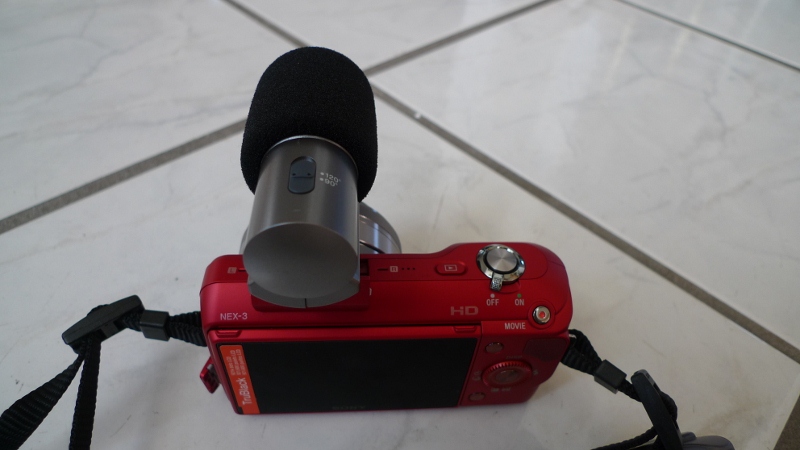
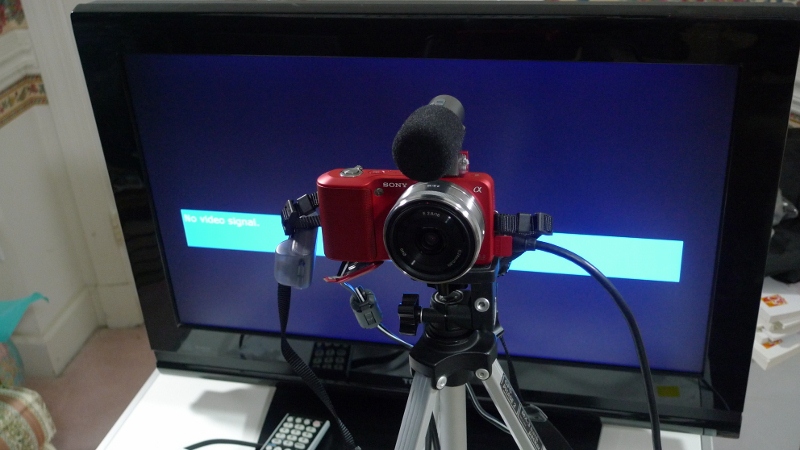
In this video I provide an update on my video recording setup at home. For the last few months, I have been using the same setup, recording the videos with a Panasonic Lumix DMC-LX3 digital camera, which has been performing very well but that it doesn’t have an external microphone input and I thought I could improve the sound quality of the video recording by using a camera with an external microphone so I began searching and I found this website called snapsort.com where you can put in various features that you want in the camera for example external microphone, low light sensitivity, a small form factor, specific price points, etc. and the site recommends cameras mathing the features you want. When I put everything I wanted, snapsort.com showed Sony Alpha NEX-3 as a top choice. I checked it out on amazon.com and they had a good price for a Sony Alpha NEX-3 with a 16mm wide-angle lens, so I bought it along with an external microphone (model Sony ECM-SST1) for recording my videos. Here are some photos of the camera and the camera on a tripod in my video recording setup.
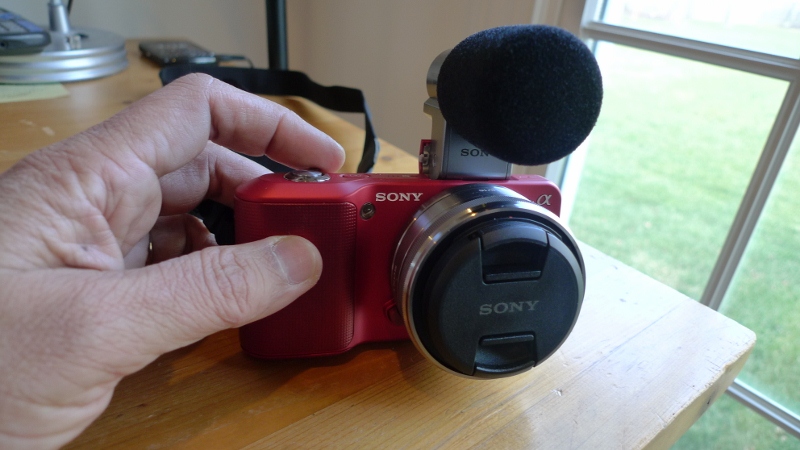


Sony Alpha NEX-3 with external stereo microphone (front view)


Sony Alpha NEX-3 with external stereo microphone (back view)

Sony Alpha NEX-3 with ECM-SST1 external mic mounted on tripod for video recording

Other than the new camera with external microphone, the rest of the video recording setup is the same with three-point lighting system and a black muslin sheet as background.

I recorded this video with the new setup and I think it does sound better with the external microphone. You can judge for yourself by comparing this video with previous ones.
Here's some more information to help you...

Here are links to the camera and external microphone and some accessories:

Friday, January 6, 2012

NBTMV - Ideas for new year’s resolution 2012


Happy new year. I bought a Sony Alpha NEX-3 camera with an external stereo microphone and I’m recording this first video of 2012 using that camera. I hope this video sounds better than my old videos recorded without an external microphone.

It’s early enough in the new year that there’s still time for you to make some new year’s resolutions and follow through on them. Here are  three ideas for new year’s resolutions, for each of which I have videos and other information in my blog.
The first idea has to do with managing your body weight. What with all the food and celebrations during the holidays leading up to the new year, your weight and fitness must be at the top of your mind. I had taken some steps in 2003 to lose over 30 lbs by thinking of my body as a system with food and exercise as input and the weight as the output. I got good results by simultaneously changing my diet (less carbohydrate, more veggies) and increasing the level of exercise. I have more information about this in a previous video.
The second idea for new year’s resolution would be to learn a new language. With all the Spanish-speaking population here in the United States, learning to speak Spanish is an ideal choice. I took the plunge over two years ago and used a 3-step approach to start speaking Spanish -- (1) Listen and Repeat, (2) Listen and Understand, and (3) Start Speaking. You can learn more about my method from some earlier videos.  
And last, but not the least, if you are empty-nesters like us and you're considering picking up traveling abroad, then I have a number of videos where I talk about strategies for starting your world travels. I think you’ll find it worthwhile to consider starting your travels with some guided tours, followed by exploring cities on your own, and finally renting apartments in a city and doing everything on your own.
Those are some of the ideas for new year’s resolutions. I hope you pick one or more of these, consult my videos, and follow through on your new year’s resolutions. Good luck!

Sunday, November 6, 2011

Why I love Google+


By now, I have posted a number of 3-minute videos (TMV), but, today I wanted to pause and tell you why I love Google+.  You see, I won’t be talking to you in this video if it were not for my joining Google+.
What I like best about Google+ is its integration of mail, calendar, documents, photos, and much more. When I get into Google+, I already have access to all of these applications right from the toolbar.That plus when I log into Google+, I can get to everything with the same login. I was already using Gmail with 2-factor authentication (please, do turn on two factor authentication for improved security, just go to your Account Settings page -- if you are on Gmail or Google+, click on your name on the upper right corner and select Account Settings to configure it - - the upshot is that when you log in, after you enter your password, you also must enter a verification code that Google sends to your phone via a text message).
Anyway, I began by sharing some photos with family on Google+ and then discovered that I could post videos on Youtube with the same login. After posting a few vacation videos, I thought why not make some short videos and share some of what I know with others. It was fun getting started with the videos that I am calling "Naba Barkakati's three minute videos" or NBTMV for short :-)
.After posting a few videos, I realized I need to provide some more helpful information, especially names of books or links to websites that I couldn’t possibly provide in the videos themselves. So I got into Blogger and, again, surprise, I could log in with my GMail login. So, I went ahead and created a blog - - nbtmv.blogspot.com and posted each video in a separate blog posting together with the transcript and other helpful information. Of course, I also began sharing these videos on Google+.
Everything was so painless that in no time at all, I had gone from a beginner on Google+ to creating my own 3-minute videos and posting them on my blog, and, of course sharing them on Google+, all of this facilitated by the single login access to mail, calendar, documents, photos, videos, blogs, and much more.
That, in a nutshell, is why I love Google+ and will continue to use it. I hope you agree and will join me on Google+.
(In my video, I didn't mention anything about circles, but I do love to be able to share my posts with selected groups of people based on my circles, but all the productivity applications in one place takes the cake for me :-)
Here's some more helpful information
To keep up with news about Google+ and some interesting posts, check out posts with the Google+ label on the official Google blog.
There are already a bunch of books on Google+, including one Dummies guide that will be published around mid-November 2011. Here are the links to a few books:

Saturday, October 29, 2011

NBTMV with update on video recording setup


Here's the latest on lighting for my low-cost video recording setup at home. I think the colors are acceptable now, with Daylight CFL (Compact Fluorescent Lamp) bulbs and Automatic White Balance (AWB) setting of my Panasonic Lumix DMC-LX3 camera.


Here are some more things to help you...


To catch up on my previous post about my video recording setup at home, see NB-TMV: How I record videos at home where I also provide links to things you may need for a similar video recording studio at your home.

Here's a sketch showing the layout of my current setup:

How I record videos at home

How I record videos at home


By now you’ve seen a few of the videos I have posted and I think I should briefly describe how I record these at home. That way, you can do the same, if you want to...

You have probably noticed how I raise my hand to turn the camera off at the end of my videos. That’s because there is no one in the room helping me with the recording. Luckily the digital amera I am using - - a Panasonic Lumix DMC-LX3 model - - seems to work out best at arm’s length, so I can reach the start/stop button easily.
Besides the digital camera, which I already had, all I had to do is spend about $40 to buy were three clamp-on lights from the local hardware store. I bought two 10-inch ones  for the Key and Fill lights and one 8-inch one for the backlight - - the Key light with a 100W equivalent Compact Fluorescent Light bulb is at 45 degrees to the left in front of me, the Fill light with a 60W equivalent bulb is at 45 degrees to my right, again, in front. The backlight is slightly behind me, to my left. I clipped on white handkerchiefs in front of each light because the light was too bright otherwise. I think the light is still not that great, as one of my friends already told me, so I plan to tweak it either through camera settings or by moving the lights back some more.
For the backdrop, I clipped on some dark sheets on a bookshelf behind me. I sit on a bench and put the camera on a tripod on a small desk placed in front of me.
Behind the camera desk, I put a small LCD TV facing me that I connected the camera’s Audio-Video output to the TV. That way, the TV becomes my monitor to check on what the video looks like. The camera displays the recording time, so that display on the monitor also cues me when my time’s up.
With all that set, I sit down, turn the camera on, make sure I appear centered in the monitor, then press the Start button and start recording... that’s all there is to it. :-)


Here are some more things to help you get going...


Here are links to some the items I used for my setup. Of course, you probabaly already have a digital camera that can capture video, but, if not, the Panasonic Lumix DMC-LX3 was great... or consider the newer DMC-LX5... and you may want to get an AC adapter (model number DMW-AC5PP) so that the battery does not run out while you record video. And you need a high-capacity SD memory card to record those videos as well.
You know, with Amazon's free shipping for orders over $25, I would have definitely ordered what I needed from Amazon instead of running around local hardware stores :-)


Naba Barkakati's three-minute vidoes (NBTMV)


I have started posting 3-minute videos on Youtube on various topics. In my first posting, I described what I intend to do:


I started this blog to post the transcripts and other helpful information related to each 3-minute video, as well as the video itself. Hope you enjoy the convenience :-)


To learn more about my video recording setup at home, see NB-TMV: How I record videos at home